Wednesday, August 26, 2015

PowerShell script to get Site Collection Hits

Hi,

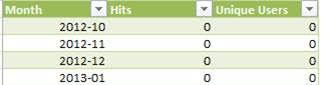
In SharePoint 2013,we can see the Monthly Site Collection Hits under Popularity trends as below
Now our requirement is

To get the total site collection hits of preceding month and trigger the email to our customer regarding the same.
For this we have written the PowerShell script as below

if ((Get-PSSnapin -Name Microsoft.SharePoint.Powershell -ErrorAction SilentlyContinue) -eq $null )
{
    Add-PSSnapin Microsoft.SharePoint.Powershell
}
#Global Variables
$site=Get-SPSite "siteurl"
$web=get-SPWeb "weburl"
$fromaddress = "abc@domain.com"
$toaddress = "xyz@domain.com"
$ccaddress = “efg@domain.com”

$date = get-date
        $numdays = $date.Day
        $ed = $date.AddDays(-$numdays)
        $numdays = $ed.Day
        $sd = $ed.AddDays( -$numdays + 1)
        $sd = ((($sd.AddHours(0-$sd.hour)).AddMinutes(0-$sd.Minute)).AddSeconds(0-$sd.Second)).AddMilliseconds(0-$sd.millisecond)
        $ed = $ed.AddDays(1)
        $ed = ((($ed.AddHours(0-$ed.hour)).AddMinutes(0-$ed.Minute)).AddSeconds(0-$ed.Second)).AddMilliseconds(0-$ed.millisecond)


#EndRegion Global Variables

#Region Site Collection Hits
$SSP = Get-SPEnterpriseSearchServiceApplication

$Filterdate = (Get-Date).AddDays(-1)
$AnalyticsResult = $SSP.GetRollupAnalyticsItemData(1,[System.Guid]::Empty,$site.ID,$web.ID)

#EndRegion Site Collection Hits

#############Email for Site Collection Hits ####################################
$Subject = "Site Collection Hits for the Month of -" + $sd.Date.Date.ToString("MMM")+$sd.Date.Date.ToString("yy")
$body = "--------------------------------------------------------------------------------------------"<br>Site Collection Hits are - "+$AnalyticsResult.GetHitCountForMonth($Filterdate) +"<br> -------------------------------------------------------------------------------------------------"
$attachment = $filename
#SMTP IP Address of Production
$smtpserver = "IP Address"
$message = new-object System.Net.Mail.MailMessage
$message.From = $fromaddress
$message.To.Add($toaddress)
$message.To.Add($ccaddress)
$message.IsBodyHtml = $True
$message.Subject = $Subject
$attach = new-object Net.Mail.Attachment($attachment)
$message.Attachments.Add($attach)
$message.body = $body
$smtp = new-object Net.Mail.SmtpClient($smtpserver)
$smtp.Send($message)
$message.Dispose()
$smtp.Dispose()
$salestoolsadditionsfile.Delete()
#######################################################

Finally email has been triggered without put as below

Thursday, June 25, 2015

Top Visitors Web Part

Hi,

There was a requirement for our customers i.e. to display the top visitors on every page.
For this our design plan was
1)To log the user details like userid, user display name, site url and logged time.
2)Stored procedure to insert the values into the table
3)Stored procedure the read the values from the table.

Before starting we have created the table with column names as below
For the LoggedinDate column we have set the DataType as below
Because, as soon as values get inserted in the row it would take the system under LoggedinDate column
Post this created a stored procedure to insert values into the table
Post this ,created a stored procedure to get the users as below


On Page load event, got the userid, user displayname, siteID, site url through SPWeb.
Post this, was able to insert the values into the DB through stored procedure
Now through another stored procedure, was able to get the Top Visitors to display through Grid View as below
Finally was able to display the Top Visitors list as below

Thursday, May 14, 2015

PowerShell Script To Change Page Layout

Hi,

We were migrating our application from SharePoint 2010 to SharePoint 2013.
There we faced a necessity i.e. there were so many pages where page layouts of the pages needs to be changes.

Our teammate has come with the script that serves the purpose i.e.

In the Pages Library folder, if the page layout is pagelayout1,that would be changed to pagelayout2.

Below is the script that has been used to change the page layout
Function GetFolders($PagesFolder)
{   
  foreach($folder in $PagesFolder.SubFolders)
                {
                    if ($folder.Name -ne "Forms")
                    {
                                                if ($folder.Name -eq "General")
                                {

                          $folderName=$folder.Name
                           if ($folder.SubFolders.Count -ne 0)
                        {
                                                foreach ($firstLevelSubFolder in $folder.SubFolders)
                            {
                                                   $subFolderName = $firstLevelSubFolder.Name;
                                                  
                                                   GetFiles($firstLevelSubFolder);
                                                }
                                      }
                                         elseif($folder.SubFolders.Count -eq 0)
                                         {
                                         if ($folder.Files.Count -ne 0)
                                         {
                                             GetFiles($folder);
                                         }
                                         }
                    }
                                                }
                }
}


Function GetFiles($folder)
{
    foreach($file in $Folder.Files)
       {
              if($file.Name -ne "Forms")
              {
                    
                     $spFile = $spWeb.GetFile("siteurl"+ $file.Url)
              
              if($spFile.Properties["PublishingPageLayout"].Contains("Basic Page"))
              {
              }
              elseif($spFile.Properties["PublishingPageLayout"].Contains("_catalogs/masterpage/pagelayoutname.aspx"))      
              {
              }
              else
              {                                 
                     if($spFile.Properties["PublishingPageLayout"].Contains("_catalogs/masterpage/ pagelayoutname1.aspx, pagelayoutname1 "))
                     {
                                         
                           $spFile.Properties["PublishingPageLayout"] = "_catalogs/masterpage/ pagelayoutname2.aspx, /sites/nucleus/_catalogs/masterpage/ pagelayoutname2.aspx"
                           $spFile.Update()
                     }
              }
              }
       } 
}

$spWeb = Get-SPWeb("siteurl")
$spList=$spWeb.Lists["Pages"]
$spItems = $spList.Items

GetFolders($spList.RootFolder)

$spWeb.Dispose()

Sunday, March 23, 2014

List Data to Chart App

Hi,
We had a requirement of displaying custom list field values in the form of charts.
Along with this, it is expected to select max, min, sum, average by the user from dropdown.
Once he selects any of the above, the respective value needs to be displayed.
We have developed this through SharePoint hosted app as below
<%-- The following 4 lines are ASP.NET directives needed when using SharePoint components --%>
<%@ Page Inherits="Microsoft.SharePoint.WebPartPages.WebPartPage, Microsoft.SharePoint, Version=15.0.0.0, Culture=neutral, PublicKeyToken=71e9bce111e9429c" language="C#" %>
<%@ Register Tagprefix="SharePoint" Namespace="Microsoft.SharePoint.WebControls" Assembly="Microsoft.SharePoint, Version=15.0.0.0, Culture=neutral, PublicKeyToken=71e9bce111e9429c" %>
<%@ Register Tagprefix="Utilities" Namespace="Microsoft.SharePoint.Utilities" Assembly="Microsoft.SharePoint, Version=15.0.0.0, Culture=neutral, PublicKeyToken=71e9bce111e9429c" %>
<%@ Register Tagprefix="WebPartPages" Namespace="Microsoft.SharePoint.WebPartPages" Assembly="Microsoft.SharePoint, Version=15.0.0.0, Culture=neutral, PublicKeyToken=71e9bce111e9429c" %>

<!-- The following tells SharePoint to allow this page to be hosted in an IFrame -->
<WebPartPages:AllowFraming runat="server" />

<!DOCTYPE html>
<head>
<meta http-equiv="X-UA-Compatible"  content="IE=9"></meta>
<!-- The following scripts are needed when using the SharePoint object model -->
<script type="text/javascript" src="/_layouts/15/MicrosoftAjax.js"></script>
<script type="text/javascript" src="/_layouts/15/sp.runtime.js"></script>
<script type="text/javascript" src="/_layouts/15/sp.js"></script>
<style>
html {overflow-y: scroll;}
</style>
                               
<br></br>
  <br></br>
<h1 style="font-family:arial;color:red;text-align:center;">Charts</h1>
  <br></br>
<br></br>
<div>
                                <div style="width:50%; float:left">
                                                <div style="position:relative;left:20px;">
                                 
                                                Select List: <select id="selectList" onchange="retrieveList()"></select>
                                                <br></br>
                                                <label id="xAxisLabel" style="visibility:hidden">X Axis</label>
                                <select id="XAxis" style="visibility:hidden;"></select>
                                <br></br>
                                  <label id="yAxisLabel" style="visibility:hidden">Y Axis</label>
                                <select id="YAxis" style="visibility:hidden;"></select>
                                <br></br>
                                <label id="aggregationLabel" style="visibility:hidden">Aggregation</label>
                                                <select id="aggregationList" onchange="getAggregatedValues()" style="visibility:hidden;">
                                                                <option> </option>
                                                                <option>Sum</option>
                                                                <option>Average</option>
                                                                <option>Max</option>
                                                                <option>Min</option>
                                                </select>
                                <br></br>
                                <label id="chartTypeLabel" style="visibility:hidden">Chart Type</label>
                                                <select id="myList" onchange="createChart()" style="visibility:hidden;">
                                                                <option> </option>
                                                                <option>Pie Chart</option>
                                                                <option>Column Chart</option>
                                                                <option>Bar Chart</option>
                                                                <option>Line Chart</option>
                                                                <option>Area Chart</option>
                                                </select>
                                                <br></br>
                                </div>
                                </div>
                                <div style="width:50%; float:left">
                                                <svg width="600" height="600" id="s"
xmlns="http://www.w3.org/2000/svg"  preserveAspectRatio="xMidYMid meet">
                <text x="0" y="0" fill="black" font-size="20"  visibility="hidden" id="toolTipElement"></text>
                <style type="text/css">
    path:hover {
      opacity: 0.5;
    }
  </style>
                                </svg>
                                </div>
                </div>
                <img src="../Images/Footer.png" alt="Image Description" />

               
                                <script type="text/javascript">
                                    'use strict';

                                    // Set the style of the client web part page to be consistent with the host web
                                    (function () {
                                        var hostUrl = '';
                                        if (document.URL.indexOf('?') != -1) {
                                            var params = document.URL.split('?')[1].split('&');
                                           for (var i = 0; i < params.length; i++) {
                                                var p = decodeURIComponent(params[i]);
                                                if (/^SPHostUrl=/i.test(p)) {
                                                    hostUrl = p.split('=')[1];
                                                    document.write('<link rel="stylesheet" href="' + hostUrl + '/_layouts/15/defaultcss.ashx" />');
                                                    break;
                                                }
                                            }
                                        }
                                        if (hostUrl == '') {
                                            document.write('<link rel="stylesheet" href="/_layouts/15/1033/styles/themable/corev15.css" />');
                                        }
                                    })();
                                </script>
                </head>

                <body class="clientwebpart-body" onload="getAllLists()">
                                <div class="clientwebpart-div">
                                                <span>
                                                                <script type="text/javascript">
                                                                                // Variable Declaration
var  minVal, maxVal,xScalar,y, yScalar,centerX,centerY,radius,totalData,oldStartingAngle,svgWidth,svgHeight;
var clientContext = SP.ClientContext.get_current();
var spListObj=null;
var camlQuery=null;
var spListObjItem=null;
var ListColl = '';
var hostUrl = decodeURIComponent(getQueryStringParameter("SPHostUrl"));
    var hostcontext = new SP.AppContextSite(clientContext, hostUrl);
    var web = hostcontext.get_web();
                var fieldColl;
   var lineChartX=new Array();
   var lineChartY=new Array();
                var dataName = new Array();
                var dataValue = new Array();
      var duplicateVal=new Array();
                var tempDataName=new Array();
                var tempDataVal=new Array();
                var svgdoc = document.getElementById("s");             
               
function resetDropDownList(selectedList)
{
if (selectedList.hasChildNodes()) {
            while (selectedList.childNodes.length >= 1) {
                selectedList.removeChild(selectedList.firstChild);
            }
        }
                                                                                                                                               
}                             
                                                                                                                                                                                            function getAllLists()                                                                                       
                                                                                                                                                                                            {                                                                                                                                                                                            try                                                                                                                                                                                            {
ListColl = web.get_lists();                                                                                                                                                                                    clientContext.load(ListColl);                                                                                                                                                                                                                                                                clientContext.executeQueryAsync(onGetAllListSuccess,onGetAllListFailed);
                                                                                                                                                                                                                                                }
                                                                                                                                                                                                                                                catch(e)
                                                                                                                                                                                                                                                {
                                                                                                                                                                                            alert('An error has occured during fetching data');
                                                                                                                                                                                                                                                }
                                                                                                                                                                                                                                }                             
                                                                                                                                                                                                   function onGetAllListFailed(sender, args)
                                                                                                                                                                                                                                {
                                                                                                                                                                                            alert('Request failed. ' + args.get_message() + '\n' + args.get_stackTrace());
                                                                                                                                                                                                                                }                                                                                                                                                                                           function onGetAllListSuccess(sender, args)
{
var listEnumerator = ListColl.getEnumerator();
var x = document.getElementById("selectList");
var option,oList;
var i=0;
resetDropDownList(x);
option = document.createElement("option");
option.text="--Select--";
x.add(option);
while (listEnumerator.moveNext())
{
                                                                                                                                                                                                                oList = listEnumerator.get_current();
                                                                                                                                                                                                                if(oList.get_baseTemplate()=="100")
                                                                                                                                                                                                                {
                                                                                                                                                                                                                                option = document.createElement("option");
       option.text= oList.get_title();
      x.add(option);
}
}